
Russelectric ATS – redlining related to accessory packages
New Accessory configurations available in ATS!!!
Open your configuration and switch to Standard Packages for the best pricing and lead time.
ATS portfolio is introducing new Accessory Configurations to streamline accessory selection process
Your configuration was created before the new accessory packages were introduced. Please open the configuration in Edit mode and follow the steps below to resolve the conflict.
Path-A: Keep custom
1.Once you open the configuration, it will default to “Custom” and retain your existing accessory selections. Please note that keeping “Custom” may add a $3K list price adder in some cases.
2.If you are okay with the accessory selections and pricing adder, no further action is required. You can save and close the configuration.
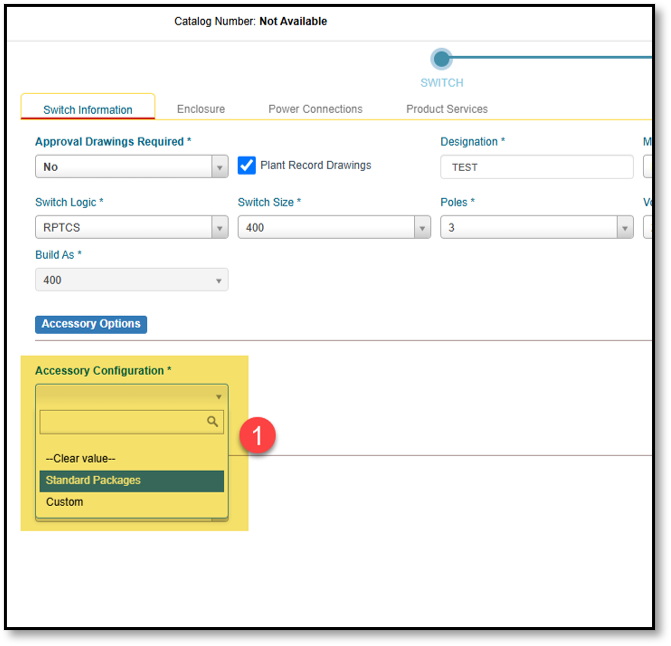
Path-B: Switch to Standard packages (optional to remove the list price adder)
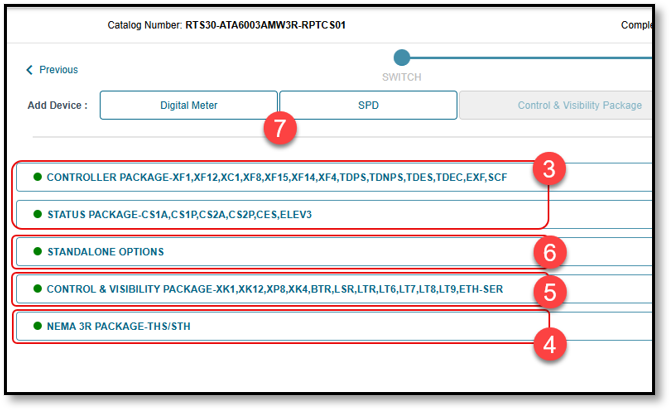
3.To remove the $3K adder, change Accessory Configuration to “Standard Packages.” The Controller and Status packages will be added by default.
4.The NEMA 3R package and/or Bypass packages will be added automatically, if applicable.
5.You can add optional packages, such as Control & Visibility, if needed.
6.You can add standard options, such as Power Monitor (PM), External Manual Operator (EMO), Ride Through, and BACnet, using the Standalone Package options.
7.You can add Digital Meter and SPD by selecting the applicable options at the top.
This article was:
